> ## Documentation Index
> Fetch the complete documentation index at: https://docs.outcome.xyz/llms.txt
> Use this file to discover all available pages before exploring further.
# Let users trade Outcome markets on your site
> Users connect their own wallet, approve trading once per session, and trade Outcome's markets on your site. Optionally earn a builder fee.
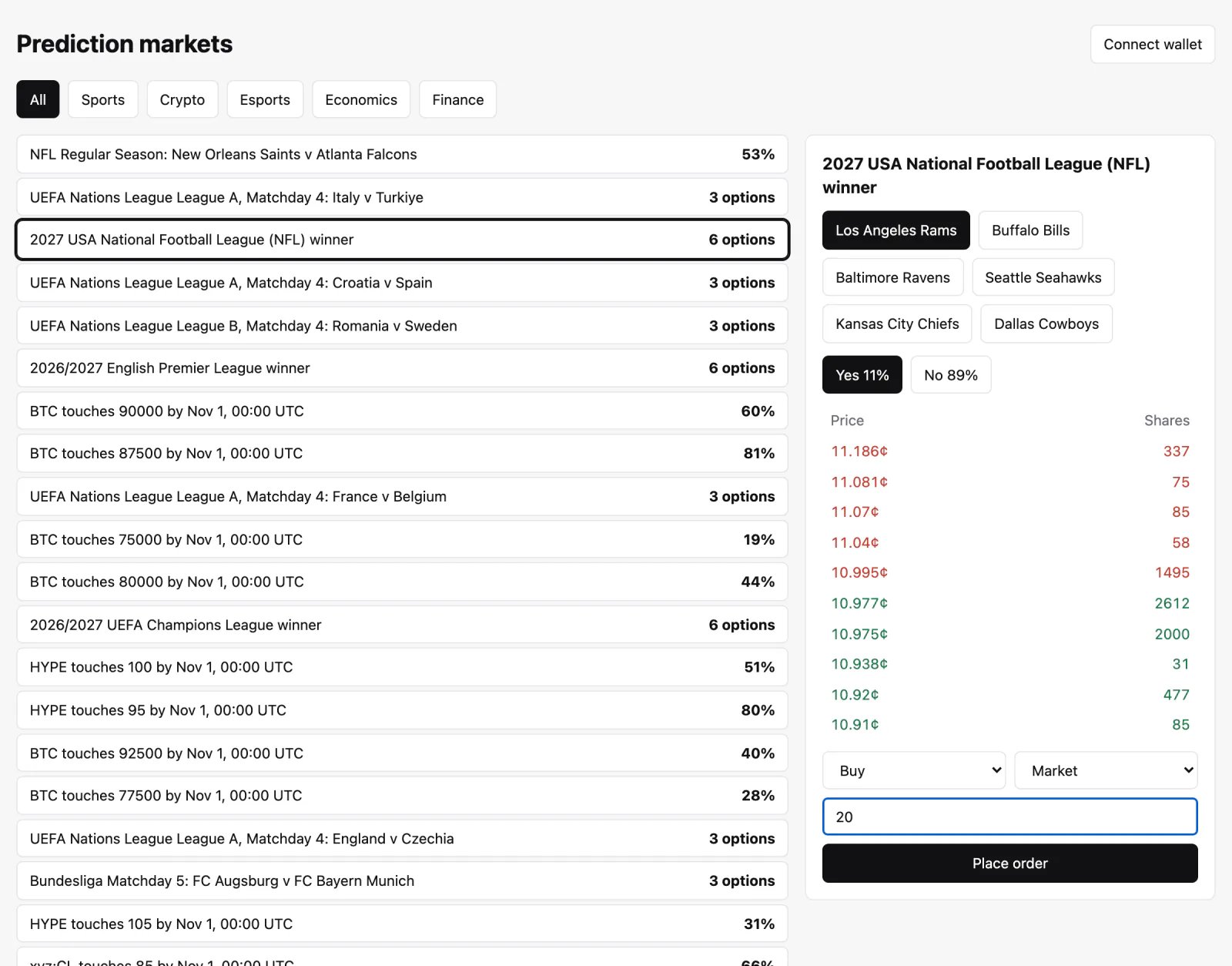
This recipe builds on [Showcase markets](/sdk/guides/recipes/showcase-markets). Instead of sending visitors to outcome.xyz, you let them trade on your site. Users trade from their own Hyperliquid account. Your site never holds their funds or their wallet keys, and orders go straight to Hyperliquid, with no backend.
 ## What you need
* `@outcome.xyz/hip4` 1.3.0 or later, and [viem](https://viem.sh).
* For your users: a browser wallet such as MetaMask or Rabby, or an embedded wallet with an EIP-1193 provider, and USDC on Hyperliquid. See [Funding your account](/funding-your-account).
* To earn a builder fee: a builder address with at least 100 USDC of perps account value on Hyperliquid.
## Who signs what
Users keep custody. Their wallet signs a few approvals, and a session key signs every order.
| Action | Signed by | How often |
| - | - | - |
| Approve your builder fee | User's wallet | Once per user, only if you charge a fee |
| Approve a session key (agent) | User's wallet | Once per session |
| Move USDC from perps to spot | User's wallet | Only when the funds sit in perps |
| Place and cancel orders | Session key | Every order, with no wallet popup |
* The session key, which Hyperliquid calls an agent or API wallet, is a private key your page generates in the browser. It can place and cancel orders for the user. It can't withdraw or transfer funds.
* The example keeps it in memory, so a reload means approving a new one. An account can have 3 named agents. Approving the same name again replaces the previous agent, so sessions don't use up the slots.
* Wallet approvals are signed for Arbitrum (chain id 42161), or Arbitrum Sepolia (421614) when the adapter uses testnet. Wallets refuse to sign for another chain, so switch the wallet first, and pass `isMainnet` to the approval helpers so they match the network.
## Funds
Outcome trades use the user's USDC spot balance. On a standard Hyperliquid account, deposits land in the perps balance, so the user moves USDC to spot first. Unified accounts have one balance and skip this step.
## Orders
* A price is a probability between 0 and 1, with at most 5 decimals. Buying Yes at `0.71` costs 71 cents a share. The SDK rounds a limit price to that tick when it sends the order.
* Shares are whole numbers. Each winning share pays 1 USDC.
* An order must be worth at least 1 USDC (`MIN_NOTIONAL`).
* The two sides of a market share one order book: a Yes bid at 0.71 is a No ask at 0.29.
* `type: "market"` sends Hyperliquid's `FrontendMarket` order at 0.99999 to buy or 0.00001 to sell. outcome.xyz instead sends an IOC limit order at a slippage price; to do the same, send `type: "limit"` with `timeInForce: "FAK"`.
* `placeOrder` doesn't throw. Check `success`. When Hyperliquid rejects an order, `error` carries its message. When it rejects the whole request, for example because the agent isn't approved, `raw` carries the message.
* `cancelOrder` doesn't throw on a rejection either. Check that `status` is `"ok"` and that every entry in `response.data.statuses` is `"success"`; a failed entry is `{ error }`.
* Trading fees are in [Fees](/fees).
## Builder fee
A [builder code](https://hyperliquid.gitbook.io/hyperliquid-docs/trading/builder-codes) lets you charge a fee on the orders your site sends. The fee is in tenths of a basis point: `10` is 0.01%, and `1000` (1%) is the maximum on spot markets such as HIP-4 outcomes. Hyperliquid doesn't charge builder fees on the buy side of spot trades, so you earn on your users' sells. Each user approves your maximum fee once, and can approve up to 10 builders.
## Run the example
The example is in the SDK repository, in [`examples/web-trading`](https://github.com/Outcome-xyz/hip4/tree/main/examples/web-trading). Walk through its code in [Full trading integration code](/sdk/guides/recipes/full-trading-integration-code).
```bash theme={null}
git clone https://github.com/Outcome-xyz/hip4.git
cd hip4
pnpm install && pnpm build
cd examples/web-trading
pnpm install
pnpm dev
```
Open `http://localhost:5173` in a browser with a wallet extension. To charge a builder fee, set `BUILDER` in `src/trading.ts`.
## Before you go live
* Hyperliquid allows 1,200 request weight per minute per IP, and these requests run in each user's browser. The example uses about 260 a minute.
* If you store the session key to survive reloads, treat it as a secret. It can't withdraw, but it can trade.
* Outcome isn't available in some jurisdictions. See [Risks](/risks#geographic-restrictions).
## Troubleshooting
The wallet has no Hyperliquid account yet. The user deposits USDC on Hyperliquid first. The example checks this with `userRole` when the wallet connects.
The session key isn't approved, or a newer session replaced it. Approve a new one.
The wallet is on another chain. Approvals are signed for Arbitrum (chain id 42161), or Arbitrum Sepolia (421614) on testnet.
The USDC may sit in perps. Move it to spot.
## Next steps
* [Full trading integration code](/sdk/guides/recipes/full-trading-integration-code)
* [Trading](/sdk/guides/trading), for every option of `placeOrder` and `cancelOrder`
This documentation is built and hosted on [Mintlify](https://mintlify.com), a developer documentation platform.
## What you need
* `@outcome.xyz/hip4` 1.3.0 or later, and [viem](https://viem.sh).
* For your users: a browser wallet such as MetaMask or Rabby, or an embedded wallet with an EIP-1193 provider, and USDC on Hyperliquid. See [Funding your account](/funding-your-account).
* To earn a builder fee: a builder address with at least 100 USDC of perps account value on Hyperliquid.
## Who signs what
Users keep custody. Their wallet signs a few approvals, and a session key signs every order.
| Action | Signed by | How often |
| - | - | - |
| Approve your builder fee | User's wallet | Once per user, only if you charge a fee |
| Approve a session key (agent) | User's wallet | Once per session |
| Move USDC from perps to spot | User's wallet | Only when the funds sit in perps |
| Place and cancel orders | Session key | Every order, with no wallet popup |
* The session key, which Hyperliquid calls an agent or API wallet, is a private key your page generates in the browser. It can place and cancel orders for the user. It can't withdraw or transfer funds.
* The example keeps it in memory, so a reload means approving a new one. An account can have 3 named agents. Approving the same name again replaces the previous agent, so sessions don't use up the slots.
* Wallet approvals are signed for Arbitrum (chain id 42161), or Arbitrum Sepolia (421614) when the adapter uses testnet. Wallets refuse to sign for another chain, so switch the wallet first, and pass `isMainnet` to the approval helpers so they match the network.
## Funds
Outcome trades use the user's USDC spot balance. On a standard Hyperliquid account, deposits land in the perps balance, so the user moves USDC to spot first. Unified accounts have one balance and skip this step.
## Orders
* A price is a probability between 0 and 1, with at most 5 decimals. Buying Yes at `0.71` costs 71 cents a share. The SDK rounds a limit price to that tick when it sends the order.
* Shares are whole numbers. Each winning share pays 1 USDC.
* An order must be worth at least 1 USDC (`MIN_NOTIONAL`).
* The two sides of a market share one order book: a Yes bid at 0.71 is a No ask at 0.29.
* `type: "market"` sends Hyperliquid's `FrontendMarket` order at 0.99999 to buy or 0.00001 to sell. outcome.xyz instead sends an IOC limit order at a slippage price; to do the same, send `type: "limit"` with `timeInForce: "FAK"`.
* `placeOrder` doesn't throw. Check `success`. When Hyperliquid rejects an order, `error` carries its message. When it rejects the whole request, for example because the agent isn't approved, `raw` carries the message.
* `cancelOrder` doesn't throw on a rejection either. Check that `status` is `"ok"` and that every entry in `response.data.statuses` is `"success"`; a failed entry is `{ error }`.
* Trading fees are in [Fees](/fees).
## Builder fee
A [builder code](https://hyperliquid.gitbook.io/hyperliquid-docs/trading/builder-codes) lets you charge a fee on the orders your site sends. The fee is in tenths of a basis point: `10` is 0.01%, and `1000` (1%) is the maximum on spot markets such as HIP-4 outcomes. Hyperliquid doesn't charge builder fees on the buy side of spot trades, so you earn on your users' sells. Each user approves your maximum fee once, and can approve up to 10 builders.
## Run the example
The example is in the SDK repository, in [`examples/web-trading`](https://github.com/Outcome-xyz/hip4/tree/main/examples/web-trading). Walk through its code in [Full trading integration code](/sdk/guides/recipes/full-trading-integration-code).
```bash theme={null}
git clone https://github.com/Outcome-xyz/hip4.git
cd hip4
pnpm install && pnpm build
cd examples/web-trading
pnpm install
pnpm dev
```
Open `http://localhost:5173` in a browser with a wallet extension. To charge a builder fee, set `BUILDER` in `src/trading.ts`.
## Before you go live
* Hyperliquid allows 1,200 request weight per minute per IP, and these requests run in each user's browser. The example uses about 260 a minute.
* If you store the session key to survive reloads, treat it as a secret. It can't withdraw, but it can trade.
* Outcome isn't available in some jurisdictions. See [Risks](/risks#geographic-restrictions).
## Troubleshooting
The wallet has no Hyperliquid account yet. The user deposits USDC on Hyperliquid first. The example checks this with `userRole` when the wallet connects.
The session key isn't approved, or a newer session replaced it. Approve a new one.
The wallet is on another chain. Approvals are signed for Arbitrum (chain id 42161), or Arbitrum Sepolia (421614) on testnet.
The USDC may sit in perps. Move it to spot.
## Next steps
* [Full trading integration code](/sdk/guides/recipes/full-trading-integration-code)
* [Trading](/sdk/guides/trading), for every option of `placeOrder` and `cancelOrder`
This documentation is built and hosted on [Mintlify](https://mintlify.com), a developer documentation platform.